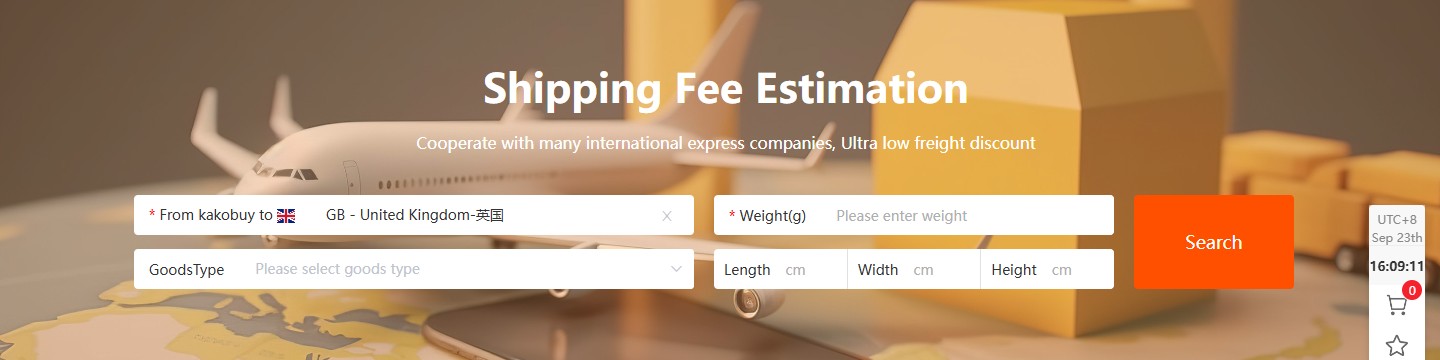
A product price tells you what an item costs before international delivery. A useful UK buying budget also needs the parcel quote. Kakobuy’s official shipping estimator has fields for destination, weight in grams, goods type, and parcel length, width and height.
Give the estimator the right inputs
Choose the United Kingdom as the destination when requesting a UK quote, then use the closest available weight and packed dimensions. Enter 2,000 grams for 2 kg. Keep the selected goods type consistent with the contents. If destination options or prices have not loaded, wait for the result or ask support; an incomplete screen is not a zero-cost shipping offer.
Compare options using the same parcel inputs. Record the total shown, the stated delivery estimate, item restrictions and the billing rules for each available service. A lighter item can still occupy substantial space, so leaving out dimensions can make your first estimate less useful.
Check again when the parcel is ready
Once the warehouse has the items, compare the final packing details with your estimate. Ask what is included in the shipping amount and whether optional services, insurance or other charges are separate. If a coupon applies, compare the payable total after the eligible deduction.
Kakobuy states that third-party logistics providers can adjust freight prices with market conditions. Save the route description and final quote at payment. This is a practical estimator walkthrough reviewed on 23 September 2026, not an announcement of a new UK route, a price reduction or a guaranteed delivery time.
This explainer was published: 2026-09-23. Sources reviewed: 2026-09-23.
Kakobuy Shipping Fee Estimation, reviewed 23 September 2026 ↗
This independent summary is not an offer or a delivery guarantee. The official terms and your current order screen apply.